

I was recently experimenting with some agentic options and "rubber ducky" pair coding with the use of local models, however quickly came to realize that my local environment needed some adjusting to perform optimally based on my hardware.
Before getting into this article however, some notes about what I mean when I refer to an LLM or AI.
When I hear AI, I think of local lookup files (generally a neural network) with varying association weights and content about different subject matter which can be plugged into a ML script for parsing on local hardware using local compute nodes.
Historically, this process was rather involved as driver and library support for the GPU compute often required compiling from source along with all their dependencies for the specific hardware, many times requiring manual fixes to support your specific hardware.
Now, thanks to efforts by innumerable open source contributors (and admittedly corporate sponsorships and donations) to various projects, these libraries are much more stable, mature, and offer a much broader support for varying hardware.
This is not a full how-to guide for getting up and running with local models, but in short if your system has hardware acceleration support and can play video games, it's probably already configured for use for local model processing.
You may need to install a couple packages for rocm or cuda depending on the manufacturer, but a quick search for your card and ollama usually yields simple instructions for quickly enabling support.
There are a number of model interfaces which can be used for local processing. The one I used in this test is Facebook's ollama. It's open source, cross platform, and relatively simple to get up and running.
Ollama handles downloading models automatically and runs as a background service with minimal configuration.
Pro Tip though if you want to store your models somewhere else than /usr/share/ollama/.ollama, create an override in /etc/systemd/system/ollama.service.d/override.conf with the following:
[Service]
Environment="OLLAMA_MODELS=/mnt/path/to/really/fast/storage"
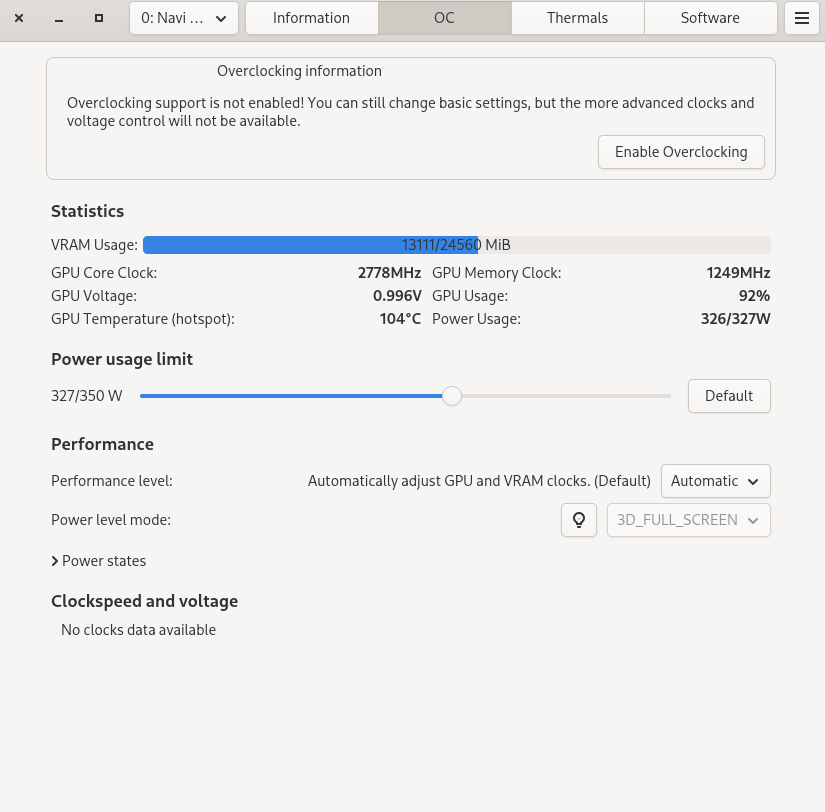
For monitoring performance, an easy option is LACT from Ilya Zlobintsev. This provides some management of Nvidia and AMD cards and provides a monitoring view to see current metrics.
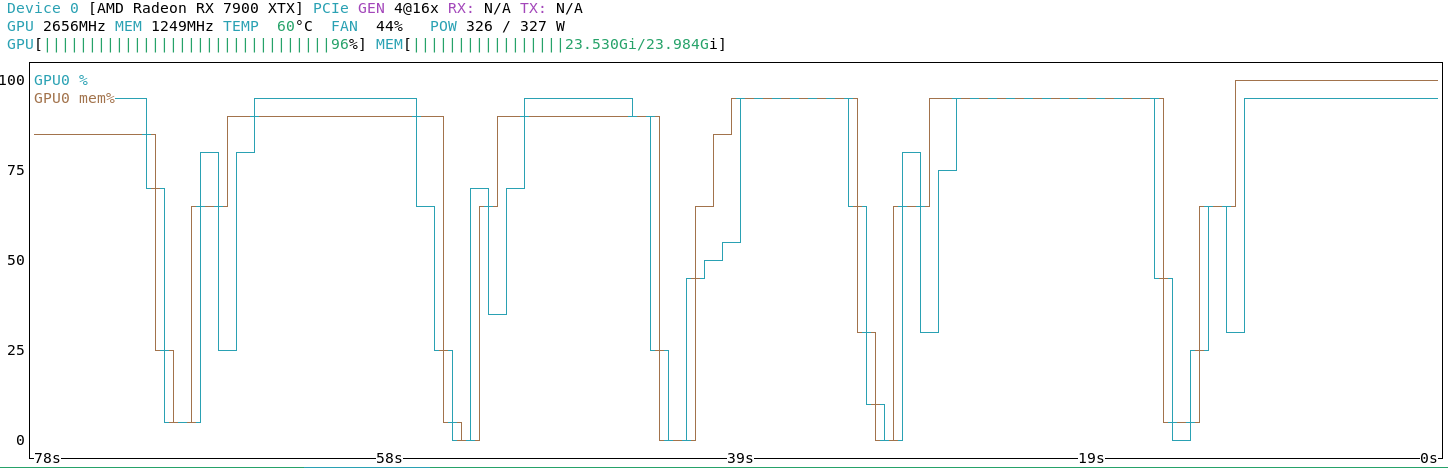
For a less graphical option, the nvtop application renders a similar realtime view of performance in a terminal.
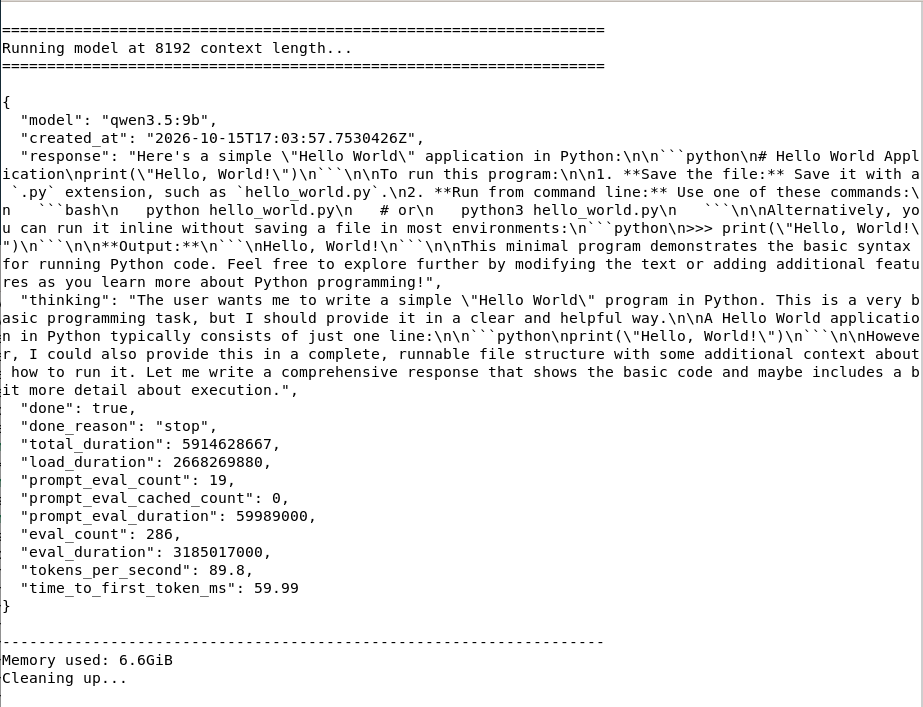
Benchmarking a model is as simple as just running it and evaluating the response.
To make the process easier and repeatable however, I created a small LLM / Ollama benchmarking script which I used herein to test different models against my hardware to help determine capabilities and limits.
Before I get into the details of my benchmarking tests though...
Since models are essentially just lookup tables, all the data stored and queried must first be converted to a numeric token via a tokenizer so it can be indexed and referenced. Different models use different methods of tokenizing data, each with different benefits and disadvantages. This tokenization is usually dependent on the type of work intended to be performed by the lookup model and is hard coded into the database at the time of generation.
Tokenization is critical because an LLM does not natively understand the English language; models do not understand any human language.
Write a 'hello world' application in Python
Given the above prompt, it is first broken down into a series of indexable tokens. Each word, phrase, and/or punctuation is considered a different unique token. Once tokenized, the prompt is sent to the model for processing.
"Python" token will map the references within the database which map that index. This will include any data ingested referring to certain snakes and a programming language.
Since the tokens "application" and "write" are also included, the lookup model generally understands the prompt is not referring the animal, as the programming language has more matches when combined with the other tokens in the prompt.
Models are just static databases which are referenced against on finite resources. As such the allowed working memory must be defined at the start of the operation.
Technically an application may redefine its memory allocation to increase the allowed space, but this is computationally expensive and requires duplicating the memory at least momentarily. For small datasets of a few hundred or a few thousand entries this is generally imperceivable on modern hardware and is the normal for modern programming languages, but does still require additional computational effort.
To maximize performance of a given task, the allowed working memory space must be defined at the start of the operation. In relation to neural network models, this defines the maximum number of tokens that can be stored and processed in a single operation.
(Again, a token is literally just a word, phrase, or instruction which can be indexed.)
If the context window in the above prompt is 5, there would not be enough space to load even the base prompt, let alone any potential responses. (There are simply more words or "tokens" in the prompt than the space allocates.)
Ollama uses variable defaults for context length based on detected hardware on service boot. This limits the window to 4k tokens on hardware with less than 24GB of video memory, 32k tokens on graphics cards with up to 48GB of memory, and 256k tokens for anything larger.
Tokens and context windows are common concepts with virtually all models. How those are handled however depend greatly on how the specific model was generated and its internal indexes.
While trying out different models to assist with code lookups, API questions, and agentic workflows, I would run into weird issues with various models. Some would work well for a time, others would just crash out, and some would slow to a crawl despite being "supported" by my AMD RX 7900 XTX with 24GB of VRAM.
To help diagnose these different models, I wrote a little model benchmark test to provide insight on the amount of memory used by different models with different context windows and the performance of each model.
curl -s http://localhost:11434/api/generate -d "{ \"model\": \"$MODEL\", \"prompt\": \"Write a 'hello world' application in Python\", \"stream\": false, \"options\": { \"num_ctx\": $CTX } }"
The script iterates over each model available in the local Ollama database and performs the same prompt request using varying context windows.
Looking at the raw aggregated data across all runs helped focus in on and identify a few quirks of the different models.
Quick Tip you can download and run the same exact benchmark against your actual hardware using your actual models.
./bench.sh all
One notable observation is the efficiency of how the different models are coded to treat requests.
| Model | Context | Max Context | Memory | Tokens | Duration (sec) | Tokens/sec |
|---|---|---|---|---|---|---|
| codestral:22b | 8k | 32k | 14 GB | 54 | 1.01 | 53.11 |
| deepseek-r1:14b | 8k | 128k | 10 GB | 908 | 13.13 | 69.16 |
| deepseek-coder-v2:16b | 8k | 160k | 11 GB | 227 | 1.54 | 147.51 |
codestral processed the request at 8k context window using 54 tokens total in the query. This makes sense as Mistral optimized this model for specifically coding tasks and a coding prompt was submitted.
deepseek-r1 however, being a general purpose model, used a whopping 908 tokens for the same query when an 8k context window was allowed. Despite being 30% faster, the nearly 20x larger workload required to generate an answer meant the total duration spiked to over 13 seconds.
deepseek-coder-v2 seemed to sit somewhere between the two, with higher raw performance than codestral while not requiring as many queries to complete the answer than the general purpose r1.
:::bar
| Model | Tokens |
|:-----:|--------:|
| codestral:22b | 54 |
| deepseek-coder-v2:16b | 162 |
| deepseek-r1:14b | 307 |
| deepseek-r1:8b | 310 |
| gemma4:12b | 404 |
| gemma4:26b | 406 |
| qwen2.5-coder:14b | 107 |
| qwen3.5:27b | 219 |
| qwen3.5:9b | 134 |
| qwen3.8:27b | 131 |
:::
As stated previously, the size of the context window defines how much data can be handled in a single operation, but this requires memory to be allocated, regardless if it's actually used.
As a general note, every model increased the size of VRAM required, but how much depended on the model itself, presumably on how efficient its tokens are stored. Storing a single 16-bit short int for example takes 2 bytes of physical memory whereas a 64-bit long integer takes 8 bytes.
| Model | Context | Max Context | Memory | Tokens | Duration (sec) | Tokens/sec |
|---|---|---|---|---|---|---|
| gemma4:12b | 8k | 256k | 9 GB | 748 | 6.30 | 118.68 |
| gemma4:12b | 32k | 256k | 10 GB | 506 | 4.09 | 123.63 |
| gemma4:12b | 64k | 256k | 11 GB | 515 | 4.32 | 119.23 |
| gemma4:12b | 128k | 256k | 13 GB | 537 | 4.43 | 121.1 |
| gemma4:12b | 256k | 256k | 13 GB | 544 | 4.42 | 122.95 |
| deepseek-r1:14b | 8k | 128k | 10 GB | 908 | 13.13 | 69.16 |
| deepseek-r1:14b | 16k | 128k | 11 GB | 940 | 13.58 | 69.2 |
| deepseek-r1:14b | 32k | 128k | 14 GB | 1009 | 14.51 | 69.54 |
| deepseek-r1:14b | 64k | 128k | 20 GB | 871 | 12.54 | 69.45 |
gemma4 12b and deepseek-r1 14b both start around 10GB of VRAM needed at 8k context window lengths, but deepseek quickly jumps in memory usage as the context window size increases. Google's gemma4 is a much slower increase, presumably due to more optimized token storage.
This can be notably important for general agentic uses where a large context size is required for a task that looks at a wide variety of files within a project to generate smaller, individual tasks to be divided out and allocated to more specialized models.
:::line
| deepseek-coder-v2:16b | deepseek-r1:14b | deepseek-r1:8b | gemma4:12b | qwen2.5-coder:14b | qwen3.5:9b | |
|---|---|---|---|---|---|---|
| 8k | 11.2 | 9.9 | 6.1 | 9.0 | 9.9 | 6.6 |
| 16k | 13.8 | 11.5 | 7.3 | 9.2 | 11.5 | 6.9 |
| 24k | 16.6 | 13 | 8.4 | 9.4 | 13.0 | 7.1 |
| 32k | 19.2 | 14.5 | 9.6 | 9.5 | 14.5 | 7.4 |
| 40k | 21.9 | 16 | 11.0 | 10.5 | N/A | 7.9 |
| 48k | 22.9 | 17.5 | 12.1 | 10.7 | N/A | 8.2 |
| 56k | 23.0 | 18.9 | 13.3 | 10.9 | N/A | 8.5 |
| 64k | N/A | 20.4 | 14.4 | 11.1 | N/A | 8.8 |
| 72k | N/A | 21.9 | 15.3 | 11.3 | N/A | 9.1 |
| 80k | N/A | 22.7 | 16.4 | 11.4 | N/A | 9.0 |
| 88k | N/A | N/A | 17.5 | 11.6 | N/A | 9.2 |
| 96k | N/A | N/A | 18.5 | 11.8 | N/A | 9.5 |
| 104k | N/A | N/A | 19.6 | 12.0 | N/A | 9.6 |
| 112k | N/A | N/A | 20.8 | 12.2 | N/A | 9.8 |
| 120k | N/A | N/A | 21.9 | 12.4 | N/A | 10.1 |
| 128k | N/A | N/A | 23.0 | 12.6 | N/A | 10.3 |
:::
:::line
| codestral:22b | gemma4:26b | qwen3.5:27b | qwen3.8:27b | |
|---|---|---|---|---|
| 8k | 13.8 | 18.9 | 17.0 | 18.2 |
| 16k | 15.6 | 19.1 | 17.4 | 18.4 |
| 24k | 17.4 | 19.3 | 17.9 | 19.0 |
| 32k | 19.0 | 19.4 | 18.4 | 19.5 |
| 40k | N/A | 19.6 | 18.9 | 20.1 |
| 48k | N/A | 19.8 | 19.4 | 20.6 |
| 56k | N/A | 19.6 | 19.9 | 21.2 |
| 64k | N/A | 19.8 | 20.4 | 21.7 |
| 72k | N/A | 19.9 | 20.9 | 22.2 |
| 80k | N/A | 20.1 | 21.4 | 22.3 |
| 88k | N/A | 20.3 | 21.9 | N/A |
| 96k | N/A | 20.5 | 22.4 | N/A |
| 104k | N/A | 20.6 | 22.9 | N/A |
| 112k | N/A | 20.8 | 23.0 | N/A |
| 120k | N/A | 21.0 | N/A | N/A |
| 128k | N/A | 21.1 | N/A | N/A |
:::
To test memory ballooning and determine the maximum context size for each model, the bench test starts at 8k context size and increases by 8k on each step until the script detects that GPU memory has been exhausted and system memory starts to be used.
| Model | Context | Max Context | Memory | Tokens | Duration (sec) | Tokens/sec | | --------------------- | ------- | ----------- | ------ | -----: | -------------: | ---------: | | deepseek-coder-v2:16b | 48k | 160k | 23 GB | 216 | 1.51 | 143.07 | | deepseek-coder-v2:16b | 56k | 160k | 23 GB | 224 | 3.51 | 63.78 | | deepseek-r1:14b | 72k | 128k | 22 GB | 737 | 10.57 | 69.76 | | deepseek-r1:14b | 80k | 128k | 23 GB | 307 | 7.79 | 39.42 | | gemma4:26b | 240k | 256k | 24 GB | 506 | 4.45 | 113.8 | | gemma4:26b | 248k | 256k | 24 GB | 571 | 18.35 | 31.12 | | qwen3.5:27b | 104k | 256k | 23 GB | 317 | 8.84 | 35.86 | | qwen3.5:27b | 112k | 256k | 23 GB | 664 | 28.66 | 23.17 | | qwen3.8:27b | 72k | 256k | 22 GB | 202 | 3.26 | 61.87 | | qwen3.8:27b | 80k | 256k | 22 GB | 140 | 3.48 | 40.23 | This information is important to know for your specific hardware because performance plummets as soon as the ML code starts hitting system memory. This is because on my system with DDR4-3200, the system memory can do 3.2 billion transfers per second whereas the GDDR6 on the 7900 XTX handles a blistering 20 billion. When dealing with a dataset that consists of 20 billion keys, that's a difference of 1 second to over 6 seconds to lookup each value.
With this data, I can see that for my specific card I should enforce the limits of:
Note my workstation has a single GPU, so that card must handle both desktop operations and model computations at the same time. As such I do not have the entire VRAM available to dedicate, and activities like watching a video or playing a game while running a model will hinder the amount of memory available for processing.
| Model | Context | Max Context | Memory | Tokens | Duration (sec) | Tokens/sec |
|---|---|---|---|---|---|---|
| codestral:22b | 32k | 32k | 19 GB | 65 | 1.21 | 53.85 |
| deepseek-r1:8b | 128k | 128k | 23 GB | 420 | 3.72 | 112.86 |
| qwen2.5-coder:14b | 32k | 32k | 14 GB | 111 | 1.57 | 70.6 |
Some models like codestral, qwen2.5-coder, and deepseek-r1 have embedded maximum context sizes smaller than what my hardware can support, so attempting to set a context size of 256k on codestral (for example) will result in the memory allocation being limited to 32k.
The bench script detects this and skips tests beyond what the individual model is coded to support.
The most visible metric for performance of a model is tokens per second; the number of tokens which can be processed in a given operation.
| Model | Context | Max Context | Memory | Tokens | Duration (sec) | Tokens/sec |
|---|---|---|---|---|---|---|
| gemma4:26b | 24k | 256k | 19 GB | 406 | 2.10 | 193.68 |
| deepseek-coder-v2:16b | 16k | 160k | 14 GB | 162 | 1.10 | 147.58 |
| gemma4:12b | 216k | 256k | 13 GB | 573 | 4.29 | 133.6 |
| deepseek-r1:8b | 112k | 128k | 21 GB | 475 | 4.20 | 113.07 |
| qwen3.5:9b | 136k | 256k | 11 GB | 204 | 2.26 | 90.35 |
| qwen2.5-coder:14b | 8k | 32k | 10 GB | 111 | 1.56 | 71.29 |
| deepseek-r1:14b | 24k | 128k | 13 GB | 433 | 6.16 | 70.26 |
| qwen3.8:27b | 40k | 256k | 20 GB | 262 | 3.94 | 66.53 |
:::bar
| Model | Tokens/sec | | --------------------- | ---------- | | codestral:22b | 53.85 | | deepseek-coder-v2:16b | 147.58 | | deepseek-r1:14b | 70.26 | | deepseek-r1:8b | 113.07 | | gemma4:12b | 133.6 | | gemma4:26b | 193.68 | | qwen2.5-coder:14b | 71.29 | | qwen3.5:27b | 35.98 | | qwen3.5:9b | 90.35 | | qwen3.8:27b | 66.53 | :::
Raw performance for a model is beneficial, but to use a driving analogy, just because you drive fast, doesn't necessarily mean you'll get somewhere first if you don't know the route to get there. In my testing, gemma4 26b was the clear winner in terms of sheer performance clocking in at almost 200 tokens per second but it took twice as long to complete the same operation as deepseek-coder-v2 took because it processed more than double the number of tokens.
| Model | Context | Max Context | Memory | Tokens | Duration (sec) | Tokens/sec | | --------------------- | ------- | ----------- | ------ | -----: | -------------: | ---------: | | codestral:22b | 8k | 32k | 14 GB | 54 | 1.02 | 53.11 | | deepseek-coder-v2:16b | 16k | 160k | 14 GB | 162 | 1.10 | 147.58 | | codestral:22b | 16k | 32k | 16 GB | 60 | 1.12 | 53.5 | | codestral:22b | 32k | 32k | 19 GB | 65 | 1.21 | 53.85 | | codestral:22b | 24k | 32k | 17 GB | 74 | 1.38 | 53.45 | | qwen3.5:9b | 80k | 256k | 9 GB | 134 | 1.49 | 90.11 | | qwen2.5-coder:14b | 16k | 32k | 11 GB | 107 | 1.50 | 71.16 | Looking at total duration shows a different picture; codestral has a distinct advantage for coding tasks, despite being overall less capable.
:::bar
| Model | Duration (sec) |
|---|---|
| codestral:22b | 1.02 |
| deepseek-coder-v2:16b | 1.1 |
| deepseek-r1:14b | 4.88 |
| deepseek-r1:8b | 2.74 |
| gemma4:12b | 3.12 |
| gemma4:26b | 2.1 |
| qwen2.5-coder:14b | 1.5 |
| qwen3.5:27b | 6.11 |
| qwen3.5:9b | 1.49 |
| qwen3.8:27b | 2.23 |
:::
While I originally purchased this workstation-class 7900 XTX to handle video encoding and editing, its 24GB VRAM does work nicely for local model work. For cards with less memory available, local models can still be used, albeit it seems that the trend is older models generally work better on memory-constrained devices, like the 1-year old qwen2.5-coder.
| Model | Context | Memory | Tokens | Duration (sec) | Tokens/sec | | ----------------- | ------- | ------ | -----: | -------------: | ---------: | | deepseek-r1:8b | 8k | 6 GB | 710 | 6.32 | 112.33 | | qwen3.5:9b | 8k | 7 GB | 286 | 3.19 | 89.8 | | qwen3.5:9b | 16k | 7 GB | 184 | 2.06 | 89.33 | | qwen3.5:9b | 24k | 7 GB | 331 | 3.68 | 89.85 | | deepseek-r1:8b | 16k | 7 GB | 413 | 3.66 | 112.75 | | qwen3.5:9b | 32k | 7 GB | 406 | 4.53 | 89.65 | | qwen3.5:9b | 40k | 8 GB | 256 | 2.84 | 90.12 | | qwen3.5:9b | 48k | 8 GB | 273 | 3.08 | 88.63 | | deepseek-r1:8b | 24k | 8 GB | 728 | 6.50 | 111.98 | | qwen3.5:9b | 56k | 8 GB | 246 | 2.74 | 89.69 | | qwen3.5:9b | 64k | 9 GB | 265 | 2.96 | 89.64 | | qwen3.5:9b | 80k | 9 GB | 134 | 1.49 | 90.11 | | gemma4:12b | 8k | 9 GB | 748 | 6.30 | 118.68 | | qwen3.5:9b | 72k | 9 GB | 259 | 2.90 | 89.43 | | gemma4:12b | 16k | 9 GB | 607 | 4.97 | 122.22 | | qwen3.5:9b | 88k | 9 GB | 174 | 1.94 | 89.79 | | gemma4:12b | 24k | 9 GB | 503 | 4.20 | 119.74 | | gemma4:12b | 32k | 10 GB | 506 | 4.09 | 123.63 | | qwen3.5:9b | 96k | 10 GB | 186 | 2.07 | 89.95 | | deepseek-r1:8b | 32k | 10 GB | 346 | 3.07 | 112.64 | | qwen3.5:9b | 104k | 10 GB | 283 | 3.15 | 89.91 | | qwen3.5:9b | 112k | 10 GB | 275 | 3.09 | 89.13 | | deepseek-r1:14b | 8k | 10 GB | 908 | 13.13 | 69.16 | | qwen2.5-coder:14b | 8k | 10 GB | 111 | 1.56 | 71.29 | | qwen3.5:9b | 120k | 10 GB | 151 | 1.67 | 90.3 | | qwen3.5:9b | 128k | 10 GB | 321 | 3.57 | 90.01 | deepseek-r1 and qwen3.5 are clear winners in terms of budget builds, with most of their 8 and 9 billion parameter models fitting nicely under 12GB for most contexts, even up to 128k tokens.
Note this benchmark script queries the GPU directly via rocm-smi or nvidia-smi to get the real memory used by the ollama process. ollama ps seems to list only active memory, which can vary greatly from actual reserved memory.
| Model | Mem (8k) | Date | comp | ins | tool | think | img | aud | | --------------------- | -------- | -------- | ---- | --- | ---- | ----- | --- | --- | | codestral:22b | 14 GB | 2024 Sep | ✓ | ✓ | | | | | | deepseek-coder-v2:16b | 11 GB | 2024 Sep | ✓ | ✓ | | | | | | deepseek-r1:8b | 6 GB | 2025 Jul | ✓ | | ✓ | ✓ | | | | deepseek-r1:14b | 10 GB | 2025 Jul | ✓ | | ✓ | ✓ | | | | gemma4:12b | 9 GB | 2026 Oct | ✓ | | ✓ | ✓ | ✓ | ✓ | | gemma4:26b | 19 GB | 2026 Oct | ✓ | | ✓ | ✓ | ✓ | | | qwen2.5-coder:14b | 10 GB | 2025 May | ✓ | ✓ | ✓ | | | | | qwen3.5:9b | 7 GB | 2026 Oct | ✓ | | ✓ | ✓ | ✓ | | | qwen3.5:27b | 17 GB | 2026 Oct | ✓ | | ✓ | ✓ | ✓ | | | qwen3.8:27b | 18 GB | 2026 Sep | ✓ | | ✓ | ✓ | ✓ | | * compl - completion * ins - insert support * think - thinking * img - vision support * aud - audio support
Not surprising, the only models that have autocomplete insertion support are the models which are primarily designed as programming models. These include qwen2.5-coder, codestral, and deepseek-coder-v2.
Although the 11 GB weight at 8k token size can be a bit heavy to use for an autocomplete assistant, the impressive 140 tokens/s speed of Deepseek v2 from late 2024 looks to be promising to experiment with.
Tool use seems to be common for models since 2025, but Deepseek's coder could certainly benefit from this addition, as tools are how models interact with files for automatic read and write access required in agentic use cases.
Thinking is another common feature in models since 2025, though oddly lacking in Qwen's 2.5 coder model, though this may be due to the older underlying qwen2 architecture simply not having support. Thinking can be useful to debug what logic the model applies while it searches its database for an answer and some programs will list this separately as an ephemeral output that changes as the model works.
Google's Gemma4 12b model is built with image and audio support, which can be useful for voice to text or text to voice, but a waste of space for simple coding tasks and even agentic work.
This 22.2B parameter looks powerful in theory, but its very limiting 32k context limit and lack of tooling and thinking support severely handicap its practical use.
Honestly this model looks like a proof of concept from Mistral AI to dip their toe into the waters.
Model Response:
Sure, here is a simple \"Hello, World!\" program in Python:
print(\"Hello, World!\")When you run this program, it will print the text \"Hello, World!\" to the console.
All iterations of this model produced very similar, no-frills results.
Sheer performance of the model was on the lower end from all the other models tested, but it makes up for that with efficiency; of all the models tested it used the least number of tokens
Largest context size for a card with...
| Video Memory | Context |
|---|---|
| 8 GB | N/A |
| 16 GB | 8k |
| 24 GB | 32k |
Diagnostic log for Deepseek Coder v2
An older model with only one usable parameter size of 15.7B is not overly efficient nor capable with its lack of tooling and thinking, but it is crazy fast in terms of sheer performance.
Its support of 160k context windows is nice, but good luck getting anywhere close to that with its inefficient indexing.
Model Response:
Certainly! Below is a simple \"Hello, World!\" program written in Python:
# This is a comment. It will be ignored by the Python interpreter.

# Define a function that prints \"Hello, World!\"
def print_hello_world():
    print(\"Hello, World!\")

  # Call the function to execute the code
  print_hello_world()
When you run this code, it will output:
Hello, World!Here's a breakdown of the code:
1. Function Definition: Theprint_hello_worldfunction is defined to contain the code that prints \"Hello, World!\". 2. Function Call: Theprint_hello_world()function is called to execute the code within the function. 3. Print Statement: TheYou can run this code in any Python environment, such as a local installation or an online Python interpreter.
It's nice it provides more help context around what code it generates and what the different parts of the code do, but that's not what the prompt stated; it didn't state "generate and describe the application", it was just "generate".
This extra detail may be nice for a chat bot or pair developer, but as a tool to just do a simple job; it's a bit too inefficient and noisy for my preferences.
Largest context size for a card with...
| Video Memory | Context |
|---|---|
| 8 GB | N/A |
| 16 GB | 16k |
| 24 GB | 48k |
Diagnostic log for Deepseek-r1 8B Diagnostic log for Deepseek-r1 14B
I'm not entirely sure what to think about the R1 model from Deepseek; it appears to be a hodge podge of whatever they could get their hands on.
The 8.2B parameter model is based off the qwen3 architecture but the 14.8B parameter model is based off the qwen2 architecture.
This was also the only model which provided HTML when asked for a Python "hello world" application...
Model Response
Here are a few ways to create a \"Hello World\" application in Python, ranging from the simplest to more complex examples:
1. Simple Console Application
This is the most basic way to print \"Hello World\" to the terminal:
print(\"Hello World!\")2. Command-Line Argument Version
Prints \"Hello World\" but allows a custom greeting via command-line arguments:
import sys

greeting = \"Hello World!\"
if len(sys.argv) > 1:
    greeting = \" \".join(sys.argv[1:])
print(greeting)
Usage:
python hello.py \"Hola Mundo\" # Prints \"Hola Mundo\"3. Basic GUI Application (Tkinter)
Displays a window with \"Hello World\":
import tkinter as tk

root = tk.Tk()
root.title(\"Hello World\")
label = tk.Label(root, text=\"Hello World!\")
label.pack(pady=20)
root.mainloop()
4. Web Browser Application (Flask)
Serves \"Hello World\" as a webpage:
from flask import Flask, render_template

app = Flask(__name__)

@app.route('/')
def hello():
    return render_template('hello.html')

if __name__ == '__main__':
    app.run(debug=True)
Create
hello.htmlin atemplatesfolder: ```htmlHello World
```
..... this goes on for a WHILE, illustrating many different options to achieve an otherwise simple "hello world".
With the addition of thinking support, diagnostic output of the logic process is available which is nice, but it certainly illustrates quite well just how many loops the logic runs through before giving a response.
For agentic workflows this model may be beneficial for a team lead bot where it is responsible for planning out a project, but for an actual worker bot to do actual work; it seems to waste far too much time in "thinking" about how to do something than it does actually doing the thing.
Though then again it may just internally debate with itself endlessly instead of actually delegating anything...
Largest context size for a card with...
| Video Memory | Context w/8B | Context w/14B |
|---|---|---|
| 8 GB | 8k | N/A |
| 16 GB | 72k | 32k |
| 24 GB | 128k | 80k |
Diagnostic log for Gemma 4 12B Diagnostic log for Gemma 4 26B
Google's flagship open model seems to ship every feature they can load up and does an interesting trick with memory allocation that I haven't seen in the other models. Gemma4 seems to assign "active" regions of the database to assist with lookups.
In theory this is good as it can increase lookup performance, the entire model still needs to be loaded into memory for this active region to be selected in the first place, so you won't be loading a 31B model with a 6GB card.
The inclusion of every capability under the sun certainly fits their advertised support of Extended Multimodalities for a true "one model to rule them all", but a jack of all trades is a master of none.
Model Response
The simplest way to write a \"Hello, World!\" application in Python is a single line of code.
1. The Simple Version
Create a file named
hello.pyand paste this inside:print(\"Hello, World!\")2. The Professional Version
In larger Python projects, it is best practice to use a function and a \"main\" block. This makes the code more organized and reusable:
def main():
    print(\"Hello, World!\")

if __name__ == \"__main__\":
    main()
How to run it:
- Install Python: Make sure you have Python installed (you can check by typing
python --versionin your terminal).- Save the file: Save the code above as
hello.py.- Run the file: Open your terminal or command prompt, navigate to the folder where you saved the file, and type:
bash
  python hello.py
Explanation:
print(): This is a built-in function that tells Python to output whatever is inside the parentheses to the console.\"Hello, World!\": The quotation marks tell Python that this is a string (a sequence of characters).if __name__ == \"__main__\":: This line ensures that themain()function only runs if you execute this specific file directly, rather than importing it as a module into another script.
All iterations of both 11.9B and 25.2B models generated nearly identical responses, suggesting that all variants of the Gemma 4 family truly are one cohesive model family from a singular publisher.
I incorrectly presumed that would be just standard, but Deepseek's hodge-podge nonsense of whatever they could get their hands on provided that assumption incorrect, but it's nice to see at least first party models are consistant.
This family of models seem like a good general model for everything, but doesn't seem particularly specialized for anything.
Largest context size for a card with...
| Video Memory | Context w/12B | Context w/26B |
|---|---|---|
| 8 GB | N/A | N/A |
| 16 GB | 256k | N/A |
| 24 GB | 256k | 232k |
Diagnostic log for Qwen 2.5 Coder 14B
The coding-specialized model for the qwen2 architecture from Alibaba Cloud features tooling and auto-complete insertion support but lacks deep support due to its limiting 32k context window.
Much like Mistral's coding-specific option, this model spends its time calculating an answer to the question rather than wasting time on calculating what else you might want instead. It'll provide what you ask, but literally just what you ask, (and that's not necessarily a bad thing).
Model Response
Certainly! Here's a simple \"Hello, World!\" application in Python:
def main():
    print(\"Hello, World!\")

if __name__ == \"__main__\":
    main()
To run this application, you can save it to a file with a
.pyextension, for example,hello_world.py, and then execute it using a Python interpreter by running the following command in your terminal:python hello_world.pyThis will output:
Hello, World!
... Wait, this looks eerily similar to something already.
scrolls up to look at Deepseek Coder
OH. Deepseek appears to be literally just a clone of Qwen's product; good to know.
While it lacks a sufficiently sized context window to perform deep tasks, Qwen's inclusion of tooling in the 2.5 coder model does mean it can read and write files directly, just don't expect it to be able to dig through an entire library.
Largest context size for a card with...
| Video Memory | Context |
|---|---|
| 8 GB | N/A |
| 16 GB | 32k |
| 24 GB | 32k |
Diagnostic log for Qwen 3.5 9B Diagnostic log for Qwen 3.5 27B Diagnostic log for Qwen 3.8 27B
Alibaba seemed to take the 2.0 model framework and expand it with additional capabilities like thinking diagnostic reporting and image support and a substantially increased context limit.
Even though these are the generalized Qwen models, they still are relatively efficient with lookups, easily beating Google's offering in terms of work needed to generate an answer.
This group includes both 3.5 and 3.8 because the latter appears to be just an iteration of 3.5 built on the same qwen35 architecture, just with some slight tuning performed from the publisher.
Model Response
Here's a simple \"Hello World\" program in Python:
print(\"Hello, World!\")To run the program:
- Save the code in a file named
hello.py- Open your terminal or command prompt
- Navigate to the directory containing the file
Run the script using:
python hello.pyWhen executed, the output will be:
Hello, World!
Most iterations of both 3.5 and 3.8 produced very similar and repeatable results, with the larger parameter models performing a bit more "thinking" logic, but ultimately the same result.
I could personally do without the image support in the qwen35 family of models, but these are general purpose models so it makes sense they have this support.
Largest context size for a card with...
| Video Memory | Context w/3.5 9B | Context w/3.5 27B | Context w/3.8 27B |
|---|---|---|---|
| 8 GB | 32k | N/A | N/A |
| 16 GB | 256k | N/A | N/A |
| 24 GB | 256k | 112k | 80k |